How I built a native Mac app in 6 weeks (sans Xmas)
I was sick in bed during COVID, disconnected from everything, bingeing Andrew Price’s Blender Donut Tutorial on YouTube. To this day I don’t know why, but that series brought an almost meditative calm and let me focus on something despite the fog. Maybe the virus influenced the way my mind works. Who knows.
When I recovered, I tried Blender for real - step by step, as a deliberate experiment. How fast can you pick up basic skills in a tool this advanced using YouTube as a guide?
Turns out, the hardest part wasn’t Blender. It was YouTube.
Every pause or rewind means switching windows. Hands leave the keyboard, eyes leave the work. Sure, theater mode helps - covers most of the screen - but the rest of YouTube is still right there, one scroll away, whispering suggestions. And the real killer isn’t the sidebar. It’s the constant window-switching dance: app, browser, app, browser, hundreds of times per session. The friction compounds until you’re spending more energy managing the player than learning the actual skill.
I decided to fix this - a native macOS app, laser-focused on consuming YouTube tutorials without the noise. The idea was so enticing that… I shelved it for the next four years.
Fast forward. A few months ago my daughter Zoe decided to simulate a black hole for a school project. Guess what - it’s easier to do this in Blender (from a tutorial) than IRL. Less mass-ive work. Watching her struggle with the same window-switching dance, I thought - gosh, I was there.
That was the moment Tutorini resurfaced. And this time there was a second itch. For some time already I’d been on the lookout for a project worth some serious LLM tokens. Not yet another Next.js CRUD thing deployed to Vercel - honestly I made one of those too - I needed a proper challenge.
I expected to break this agentic-coding hype dummy in half. Silly me.
Why the hard way
If you squint your eyes, most of “I vibe-coded an app” post is the same story. Greenfield web app, one framework, well-trodden stack, deployed to Vercel. That’s testing AI on easy mode. Nobody learned anything from that.
Let me put my CTO hat on for a second. In real life, most money-making software is almost by definition legacy, off the beaten distribution path, with decisions that exist outside the tutorial domain. I wanted to test AI where the actual work lives.
So I picked a stack designed to hurt: Swift and AppKit, not SwiftUI. Private WebKit APIs. Global hotkey interception. A ghost window that tracks system-wide focus events.
And? Claude Code won. Not cleanly, not without scars. But it won.
The workflow
Everything started with a small misfire. Claude Code could not properly create a fresh Xcode project from scratch. On the second try it failed to adapt a boilerplate project I’d created by hand.
The culprit? Interface Builder files. XIBs are technically XML, you’d think an LLM would handle them fine. But they’re machine-generated text - auto-generated IDs, implicit outlet connections encoded as opaque references, structural relationships that only make visual sense inside Xcode’s GUI. Editing a XIB by hand is like performing surgery using a map where every organ is labeled with a GUID.
So I changed my approach. Converted as much setup logic as possible to be expressed directly in code - programmatic views, programmatic constraints, programmatic menu construction. And that was the enabler I needed.
It also became the first commandment of the whole project: if you can express your problem as text that a human would also write by hand, the LLM can help you solve it. Machine-generated text that’s technically readable but practically opaque? You’re too often on your own.
This rule turned out to be fractal. When I needed to discuss UI state during development, I had Claude dump it as SVG - an ancient vector format that also happens to be human-readable text. When I wanted to prototype interactions, I demanded HTML/CSS (lobby prototype). Every time I translated a visual problem into human-authored text, the quality jumped.
Tutorini had a few ambitious ideas in my head. A global double-Command-tap to activate the player from anywhere. A ghost window mode - the video would float semi-transparent over your workspace, visible but click-through. I wasn’t sure any of these were even feasible, or what the limitations would be.
I quickly discovered that bolting exploration onto a stable codebase is counterproductive. Too often I had to fight errors at the seam between experiment and existing code. More time fighting regressions than learning anything.
That led me to spikes. A spike is a standalone small project, its own repo, its own CLAUDE.md, focused on a single question. Can I capture global hotkeys? Can I make a window click-through? Can I control a WKWebView’s playback without YouTube cooperating?
Jackpot. Suddenly I could work with multiple Claude Code sessions in parallel exploring different spikes without them stepping on each other’s toes. And when a spike succeeded, I asked Claude to generate a complete INTEGRATION-GUIDE.md - a document the main project’s session could follow to absorb the code. Spike’s context stays clean. Main project stays clean. Win-win-win.
Something about how these models are trained makes them pathologically eager to produce code. You want to think through a problem, explore trade-offs, sketch possibilities - and before you finish your sentence, Claude has generated 200 lines of Swift. I started calling this code diarrhea. You know - relatively small intake, overflowing output. There’s no polite term for it.
I tried fighting it in-session. “DO NOT CODE THIS YET.” “WE NEED TO THINK ABOUT EXTERNALITIES.” Worked sometimes. Then it didn’t. Eventually I thought, fuckit, I need to solve this architecturally not conversationally.
So I created a second project - a mentat: Memory Externalized: Notes, Thinking, Analysis, Tracking. Its own repo, its own CLAUDE.md, no source code in sight. Every exploration, every what-if happened inside this project now. Why YouTube fails on virtualized macOS, how to control the video with voice, creating a landing page, plugging analytics. Plain markdown files, nothing fancy.
The two projects developed completely different personalities. The app codebase had agents like swift-macOS-developer.md and dead-code-sniper.md, with skills for debugging, committing, proof-of-concepts. The mentat had business-analyst.md, hypothesis-identifier.md, product-manager.md, skills for analytics, frontend design, communication. Same tool, different brains.
This split cured the code diarrhea. The separation wasn’t a wall, more like a strong suggestion - I sometimes asked the mentat to peek at code or plan spikes. But the bigger discovery was about context.
Available free context is an intelligence proxy. The more context window you’ve consumed with prior conversation, the narrower and more boring Claude’s output becomes. The difference between a 80%-full context and a 20%-full one is night and day. I built a /progress-compression command that dumps the current state to a markdown file (.gitignore’d) so I can safely restart fresh. The dual project approach keeps both windows lean by nature.
But I digress. While writing this very post I asked the mentat to explain our workflow. Just typed explain me our workflow and got back a structured summary of everything we’d built together over months (here’s the actual output). Three months of decisions, explorations, and trade-offs - recalled in 30 seconds. I’d forgotten half of it. The mentat hadn’t.
You may think I planned this whole framework ahead of time. Spikes, mentat, integration guides, context compression - sounds like it came from a design document.
Wrong.
Every time something went wrong, every time I was tired of repeating something for the Nth time, or I just had a worse day, I asked the same question: how can you improve your work to avoid this trap next time? And Claude would actually do it - rewrite its own docs, update the CLAUDE.md, propose new skills. Sometimes iterating a few rounds until the trap was plugged. The workflow assembled itself through accumulated frustration. That’s genuinely one of the most distinct properties of these tools - they self-improve with minimal nudging. And the experiments are cheap.
Meet Grumpy
Somewhere during a refactoring session I felt something was off. The code was drifting toward overly modern patterns - the kind that looks impressive in a blog post but fights against AppKit’s grain. Then it hit me - I need some grumpy, old macOS developer who remembers why objects have the NS prefix.
So I summoned one.
Every time I want a harsher look I type “ok, put on the hat of Grumpy, our old school Cocoa engineer, let him review the proposed change.” And I get back not just a different POV - it’s a properly role-played POV.
Here’s a taste. I asked Grumpy to review Tutorini’s context menu:
*sighs and adjusts reading glasses*
“Play/Pause” - NO. Pick one. The menu should say “Play” when paused and “Pause” when playing. This is basic state-aware UI. You’re not labeling a button, you’re describing an action. “Play/Pause” tells me nothing. It’s lazy.
It goes on. Read more examples here.
Not a gimmick. Grumpy catches things the default Claude persona sails right past. He became a core part of the process.
The honest part
It would be dishonest to paint this as a smooth ride.
GUI with animation is genuinely hard for LLMs. Anything involving animation timing, layered views, or visual polish required more hand-holding than everything else combined. Claude could scaffold the structure but rarely nailed the feel on the first try. And since UI polish is my thing, that meant a lot of back-and-forth. I lost hours to “it compiles but looks wrong” in ways that are hard to debug when you can’t point at a failing test.
The model fights structure. Even with CLAUDE.md, custom skills, and dedicated agents, keeping the workflow disciplined was a constant battle. Claude’s eagerness to please is both its greatest asset and its most annoying trait.
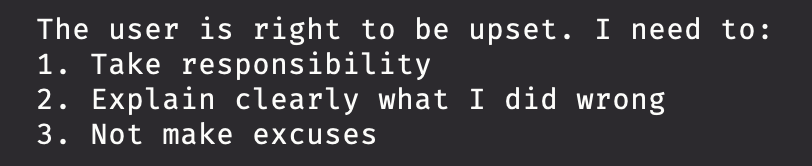
That’s a fragment from Claude Code’s thinking process. Pure Dobby energy. Endearing and maddening in equal measure.
Switching back to the old world hurts. After six weeks of this, writing code without an AI collaborator felt physically slow. Making mockups in Figma or assembling a screencast… Slow. Slow. Slow. Whether that’s a feature or a dependency - ask me again in six months.
But. Some pieces of code Claude wrote were genuinely beautiful. Not all. Not even most. But every now and then - the kind of Swift you’d be proud to have written yourself. Those moments kept me going.
I also tested the same tasks against other tools - Codex, Pi, Crush, OpenCode, various models through Open Router. I have tagged checkpoints in the git history with the exact prompts I used, so I can checkout any tag, run a different tool, and compare with the commit that already exists. In my tests, Claude Code always won. Your mileage will vary. But the benchmark setup is worth the effort on its own - it’s the difference between knowing and hoping.
If you made it this far (as in: you can tolerate my rambling), here are a few small things that helped more than they should have.
I was never sure if Claude properly read my instructions. So I added a line to the CLAUDE.md: "Your First Action: Start every session with a random programmer's joke!" If it opens with a joke, I know it read the instructions. If it doesn’t, something’s wrong with the context. Stupid diagnostic? Absolutely. Works better than anything sophisticated I could engineer.
I’m chronically ill with non-BS-thosis, and that made its way into my CLAUDE.md too:
**Be ruthless and no-bullshit.**
Always.
No softening, no hedging, no diplomatic padding.
If something is a waste of time, say "this is a waste of time" - don't say "you might consider whether..."
Prime the model on the communication style you actually want. Not the style you think you should want. This makes a bigger difference than any amount of technical prompting.
Where are we today
In my presentation I showed a spectrum:
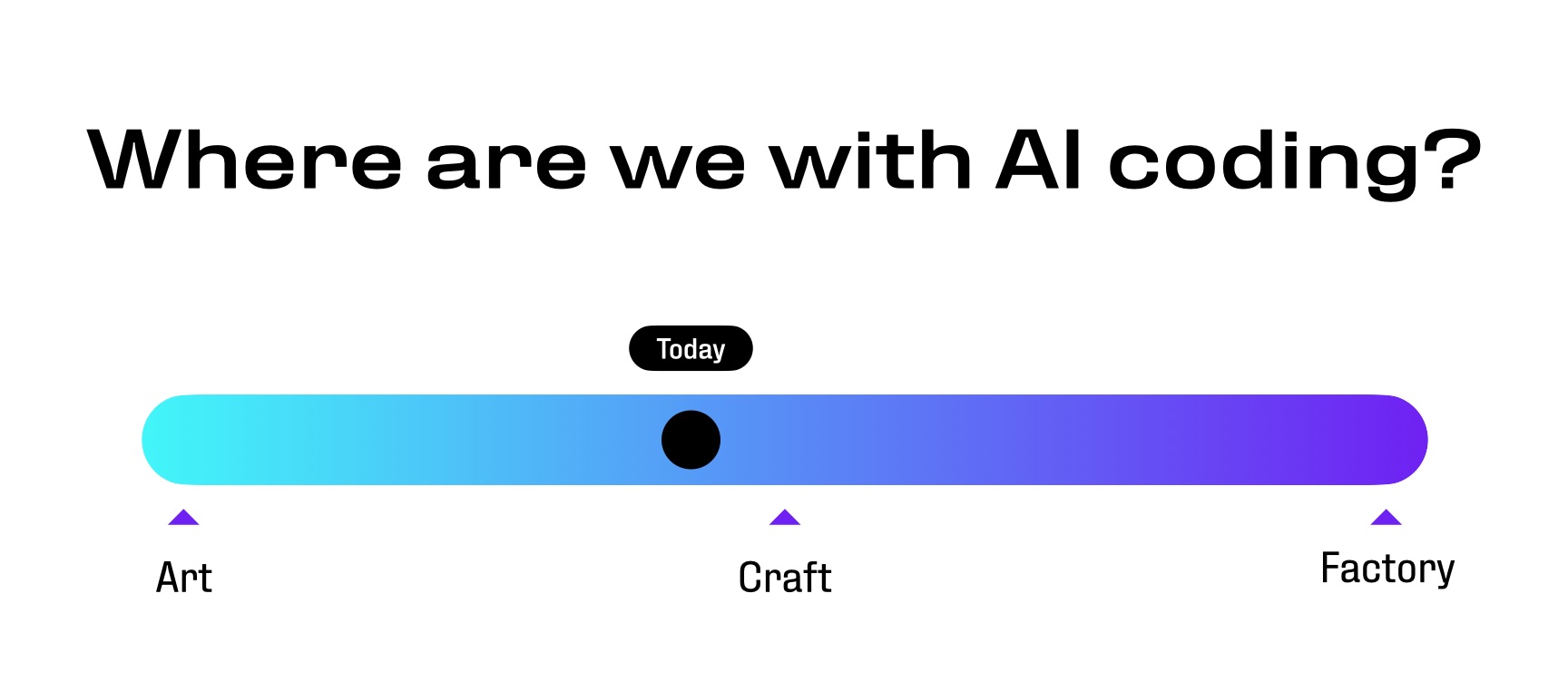
Art is the empty canvas, every stroke a decision. Factory is the assembly line. Craft sits in between - skilled work, repeatable but not mechanical, requiring taste and judgment.
I think we’re somewhere before craft. Chris Lattner nailed the tension: “There is no test suite for an idea that does not exist, and good design is hard to quantify.”1 AI excels when success criteria are clear - compile, pass tests, improve this metric. Inventing new abstractions is a different game entirely.
But here’s the thing nobody in the “AI will/won’t replace developers” crowd wants to hear: the tools being limited doesn’t mean they’re not transformative. I built a shipping Mac app in six weeks on a stack that should have taken months. The catch is that it only worked because I brought thirty years of opinions about how software should be built. Half my time went to telling Claude what not to do.
Claude Code is both the best junior developer I’ve ever worked with and the most confidently wrong one. It needs structure, guardrails, and a grumpy old engineer watching over its shoulder. Without those, it’ll confidently lead you off a cliff while explaining why the view is great. With them? It’ll surprise you.
Tutorini is free and I intend to keep it that way. Download it here.
This is an extended version of a talk I gave at AI Breakfast Warsaw, February 2026.

